Arrival assurance for public transport

Plan. Prepare. Arrive.

Not just an arrival alarm. ARRILERT helps you check that you're heading the right way, tells you when to get ready, asks you to confirm your exit, and helps if you miss your stop — and it explains every decision.

Coming soon to the App StoreFor iPhone · iOS 18 or later · English and French

  • Trains, buses, trams and metros
  • No account, no ads, no analytics
  • Your location stays on your iPhone
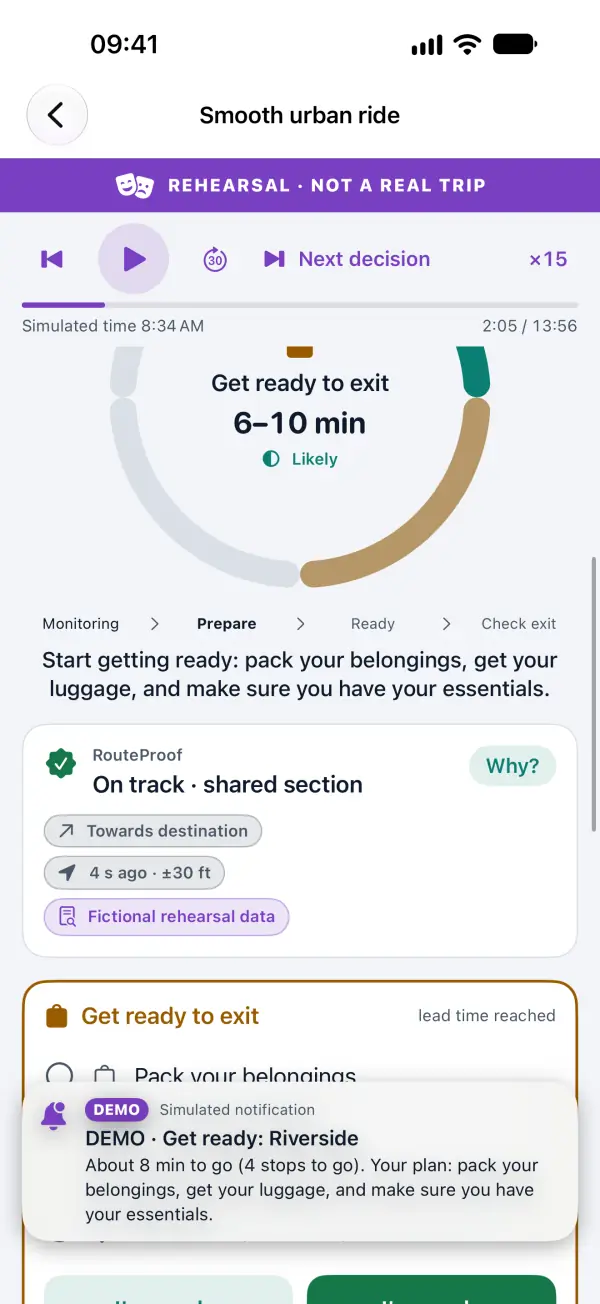
ARRILERT during a rehearsal journey: “Get ready to exit, 6–10 min, Likely”, the stages Monitoring, Prepare, Ready and Check exit, and RouteProof showing “On track”.
Screens on this page come from the in-app Rehearsal Lab.

Four questions, answered on the way

A GPS-radius alarm only knows how far away you are. ARRILERT tracks the whole arrival: the direction you're travelling, the time you need to get ready, your exit, and what to do if things don't go to plan.

Rehearsal screens. The screenshots below were captured from the app's Rehearsal Lab: fictional journeys on a fictional network, each labelled “REHEARSAL · NOT A REAL TRIP”.

RouteProof

Am I going the right way?

Mark a few checkpoints along your usual line and ARRILERT compares your recent movement with them: “on track”, “possible wrong direction”, “off the selected route” — or, honestly, “cannot determine” when the signal is poor.

Tap Why? to see the evidence for and against. Said This is my route? ARRILERT keeps the record and asks for stronger evidence before warning again. It never claims to know which vehicle you're on.
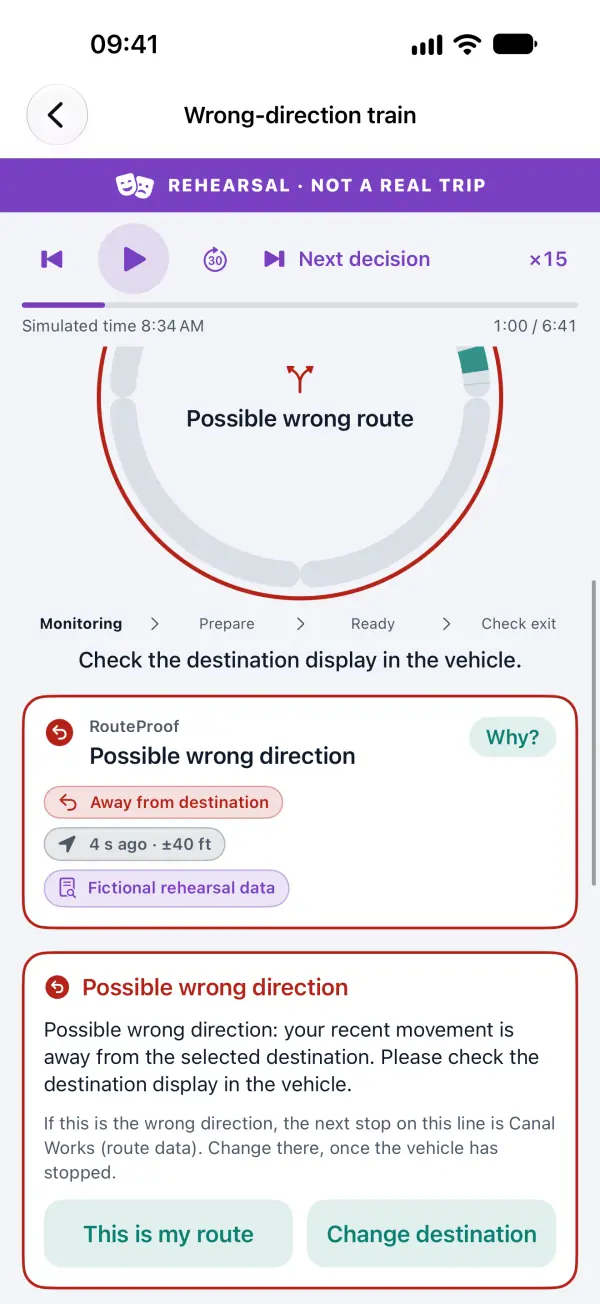
Wrong-direction train rehearsal: RouteProof shows “Possible wrong direction — your recent movement is away from the selected destination”, with the buttons “This is my route” and “Change destination”.

Exit Assurance

Will I be ready in time?

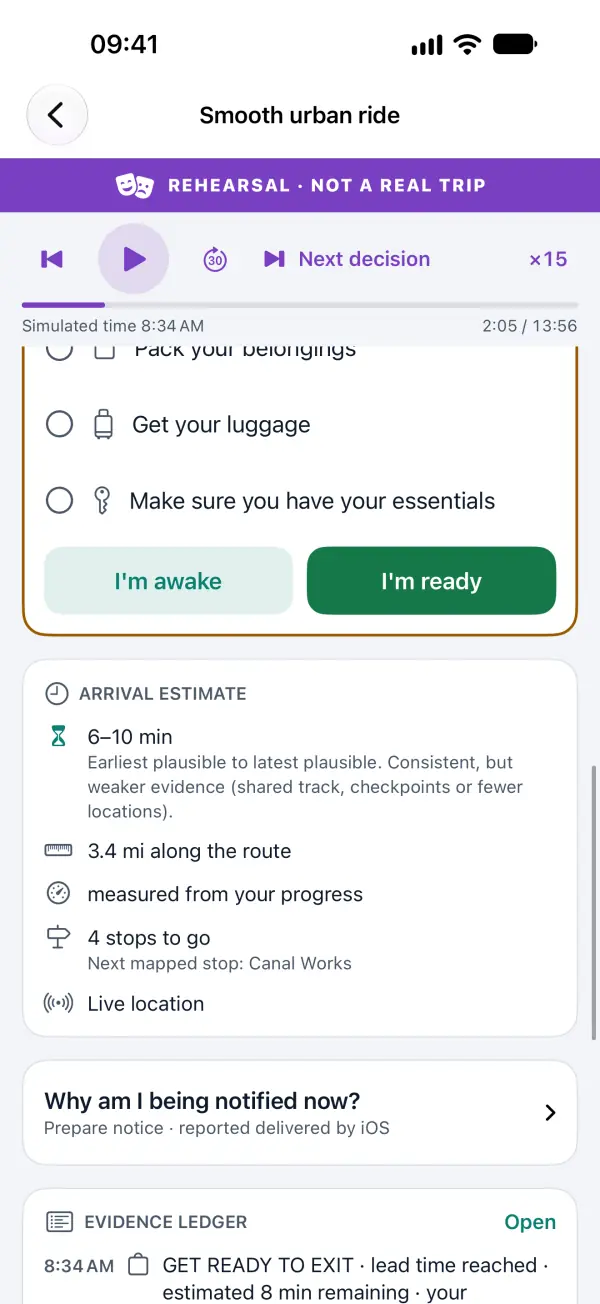
Set your own Exit Contract: how many minutes you need, an uncertainty margin, and the steps that matter to you — pack your things, get your luggage, prepare a stroller or a bike.

ARRILERT moves from Monitoring to Prepare, Ready and Check exit, shows its confidence on the Assurance Ring, and adapts when you tap I'm awake, I'm ready or Still on board. Only you confirm that you got off.

Exit Assurance in a rehearsal: a checklist (get your luggage, make sure you have your essentials) with “I'm awake” and “I'm ready”, above an arrival estimate of 6–10 min with its uncertainty explained.

Recovery Navigator

What if I miss my stop?

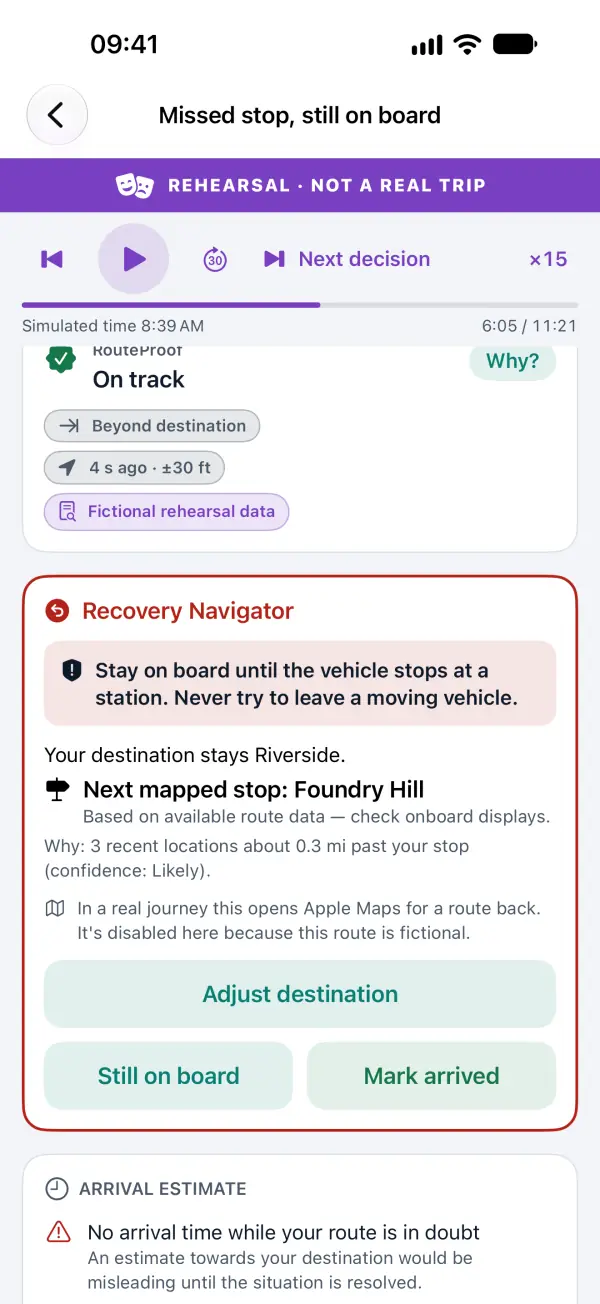
If repeated, recent locations suggest you've passed your stop, ARRILERT asks you to confirm, tells you to stay on board until the vehicle stops at a station, keeps your original destination, and offers a route back in Apple Maps.

Missed-stop rehearsal: the Recovery Navigator says “Stay on board until the vehicle stops at a station. Never try to leave a moving vehicle.” and shows the next mapped stop.

Evidence Ledger

Why this alert?

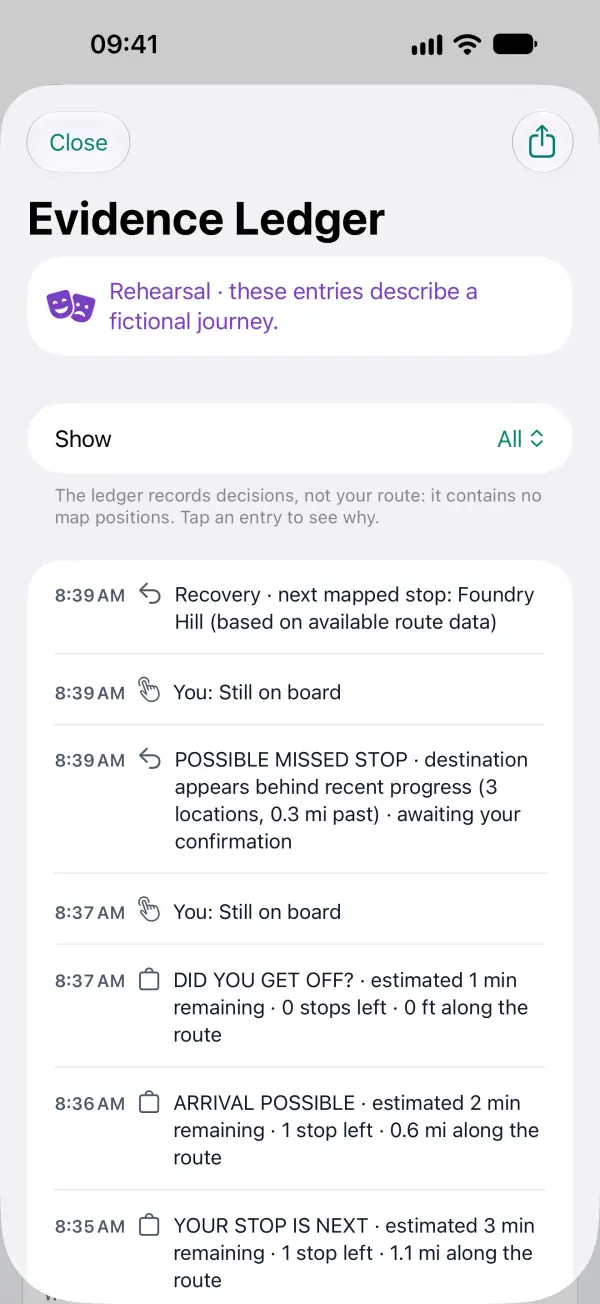
Every key decision is recorded with its reason, its confidence and the age of the data behind it — without storing your route. Export it or delete it at any time.

The Evidence Ledger of a rehearsal: a time-stamped list of decisions and your answers, with the note “The ledger records decisions, not your route: it contains no map positions.”

Rehearsal Lab

Try it without travelling

Eight fictional journeys run ARRILERT's real decision engine offline, on a simulated clock. No travel, account or data connection needed: open the app and tap Try a Journey — Demo.

  1. Smooth urban ridePrepare, ready, next stop — then you confirm your exit.
  2. Wrong-direction trainFlagged only after repeated evidence, not from one location.
  3. Fork / branch mismatchA shared section first, then the wrong branch.
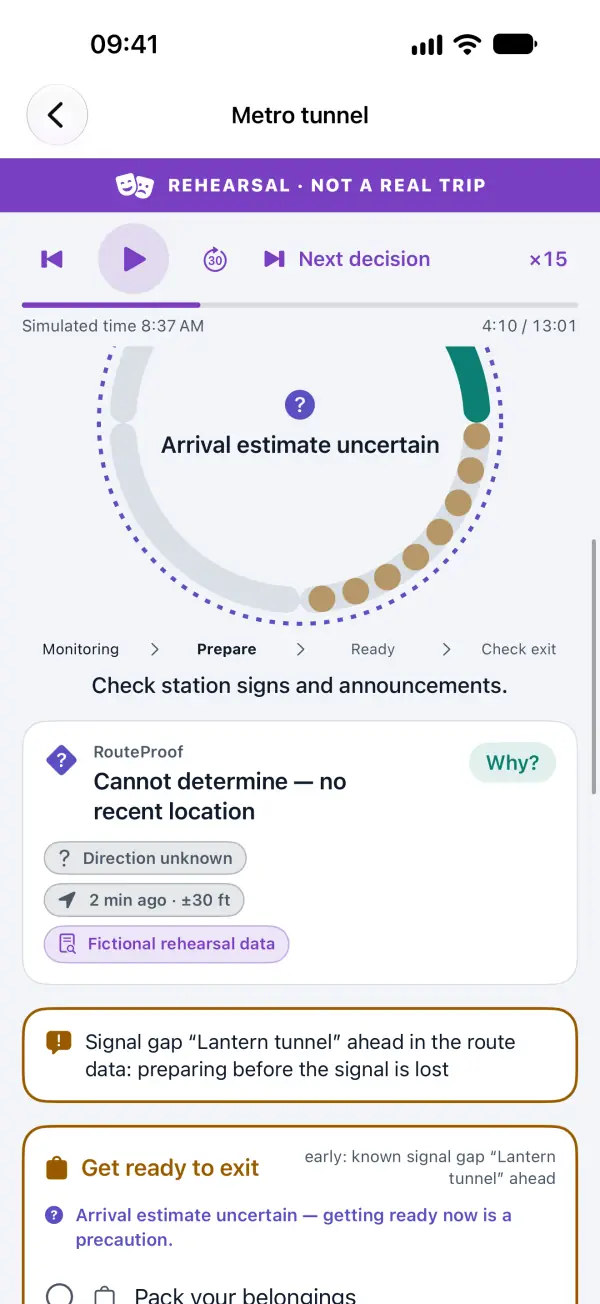
  4. Metro tunnelGet ready before a known tunnel; honest uncertainty underground.
  5. Express skips your stopA warning that the service may not stop, then recovery.
  6. Missed stop, still on boardSafety guidance and the Recovery Navigator.
  7. Notifications off + FocusWhat ARRILERT does when notices can't reach you.
  8. Poor GPS beside a parallel road“Cannot determine” instead of a guess.
Metro tunnel rehearsal: “Arrival estimate uncertain”, RouteProof “Cannot determine — no recent location”, and an early “Get ready to exit” card before a known signal gap.

Also in ARRILERT

  • Alert Readiness Check

    Sends a real test notice and gives you an honest result: iOS can tell ARRILERT that a notice was accepted and listed, but never whether a sound played.

  • Live Activity

    Your journey on the Lock Screen and in the Dynamic Island, with an indicator when the information is out of date.

  • Made for everyone

    English and French, Dynamic Type, VoiceOver, Increase Contrast, dark mode and Reduce Motion. Status is always shown with text and symbols, never colour alone.

  • Private by design

    No account, no ads, no analytics. Location is used only while a journey you started is running, and it stays on your iPhone.

What ARRILERT can and can't do

iOS can delay or silence notifications, GPS can disappear in tunnels, and only you know if you got off. ARRILERT shows its confidence, says when it can't tell, and never pretends to be a guaranteed alarm.

ARRILERT does

  • Check whether your recent movement matches the route and direction you chose (RouteProof), and say when it can't tell.
  • Tell you when to get ready based on your own preparation time, the estimate and its uncertainty.
  • Ask you to confirm your exit, and help you recover if you may have missed your stop.
  • Explain every decision in the Evidence Ledger.

ARRILERT does not

  • Guarantee that a notice reaches you or makes a sound. iOS settings, Focus, the Silent switch and battery management decide.
  • Keep working after you force-quit it, or if iOS stops it.
  • Know which vehicle you are on, whether it stops at your station, or whether its doors open.
  • Decide that you got off. Only you can confirm that.
  • Provide timetables or real-time transit data. In real journeys, route checks use only the checkpoints you place.
  • Replace staff, announcements or emergency services.

Your location stays on your iPhone

ARRILERT does not collect personal data. Your location is used on your iPhone only while a journey you started is running. Finished journeys keep the Evidence Ledger — decisions only, no positions — for the period you choose, and you can delete it at any time.